An email is like a letter. You can send an email from your home across the world in seconds, for free (apart from the use of the internet). You don't even need your own computer or smartphone. You can use an internet cafe or a public access point.
If you don't have an email account, then you can set up a web-based email account to get your own email address. This is a string of letters with "@" in it. Here are links to some web-based email companies:
| Gmail | Hotmail | Yahoo | Mail.com | Lycos |
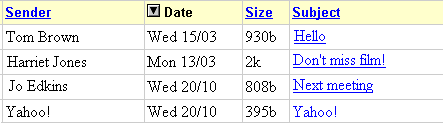
There are lots of email handlers, and they all work slightly differently, but the following is typical. To see any emails that have been sent to you, go into your email account (whether ISP- or web-based) and click on 'Check mail' or 'Read mail' or 'Inbox'. This will bring up a list of your emails. Click on one and it will appear on the screen.
To email a friend, click on 'Compose' or 'Write' or 'New'. This will come up with a blank form.
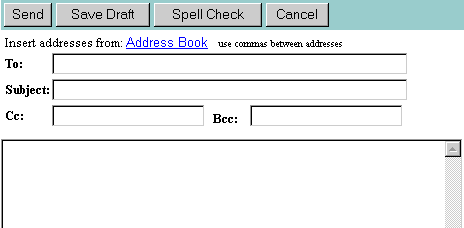
Type your friend's email address into the 'To' box. Make sure you type it accurately! Type a short description of your letter into the 'Subject' box, to help your friend know what the email is about. Type your letter into the big box at the bottom. (The 'Cc' and 'Bcc' boxes are for sending emails to more than one person). Then click on 'Send' or 'Post'. This will send your email through the internet to your friend's computer.
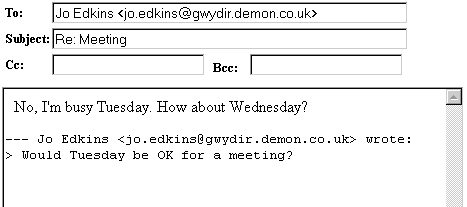
There is a quicker way to reply to an email. Bring it up on the screen (see above) and click on 'Reply'. This will show a form with the email address, subject and original email. Add your reply in the big box, and change or delete the rest if you want.
You can print your emails, or keep them in your email account, or delete them if you don't want them. Email programs also have address books, where you can keep a list of email addresses. Unfortunately, every email program is slightly different, so you will have to find out for yourself how yours works!
Emails are usually just text but can contain pictures, or other files. These 'attachments' or 'insertions' sometimes need special programs to be read. Attachments to emails can contain viruses! Do not open an attachment in an email unless you know what it is and who it is from.
You are likely to get junk email or spam. Don't worry about them. Just delete them. Sometimes you can set up your email handler to refuse any email addresses apart from your own private list (to stop spam) but this does risk refusing genuine emails that you might need to read. Never reply to an email from a stranger promising you anything. It is quite likely to be a fraud. See Viruses.
Emails are not secure. Never put anything in an email which is confidential, such as your credit card number or account details.
tutorial index --- previous page --- next page